AOP에 대한 용어정리를 이전 글에서 작성했다
따라서 이제 AOP를 어떻게 사용할 수 있는가에 대해 알아보도록 하겟다
✔️ 간단한 코드로 쉽게 이해해보기
1. LogAdvice 생성
JDBCUtil도 횡단관심사에 속하니 같은 패키지인 com.example.biz.common 에 만들어준다
public class LogAdvice{
	public void printLog() {
    	System.out.println("작은티모님의 로그");
    }
}
2. BoardServiceImpl에 선언하기
@Service("bs")
public class BoardServiceImpl implements BoardService{
	@Autowired
    private Board boardDAO;
    private LogAdvice logAdvice;//멤버변수로 선언
}

public BoardServiceImpl(){
	logAdvice = new LogAdvice();
}
DI를 해주기 위해 생성자 주입을 사용했다 주입방법은 크게 상관이 없다
4.logAdvice실행 준비
BoardServiceImpl에 모든 메서드에 logAdvice를 넣어서 로그가 실행되게 만들어준다
@Override
public boolean insertBoard(BoardDTO dto){
	logAdvice.printLog();
    return boardDAO.insertBoard(dto);
}
5. BoardClient 실행 후 콘솔
실행시키면 로그가 보드DAO보다 먼저 나오는것을 확인할수있다 즉 동작시점이 핵심관점보다 먼저라는 것을 알려준다

위의 코드에서 로그어드바이스를 향샹된 로그어드바이스로 업그레이드 됐을때 문제가 생긴다
- 보드서비스 임플리에서 해당코드를 매번 수정
- 이름이 다를수도 있음
따라서 어드바이스를 코드에 직접사용하지 않는다
⭐AOP설정을 통해 횡단관심사를 호출한다
✔️AOP 설정하기
🛠️pom.xml 설정하기
1. jar 파일 2개 pom.xml <dependency> 에 추가
      <dependency>
          <groupId>org.aspectj</groupId>
          <artifactId>aspectjrt</artifactId>
      </dependency>
      <dependency>
          <groupId>org.aspectj</groupId>
          <artifactId>aspectjweaver</artifactId>
      </dependency>
에러시 대체법
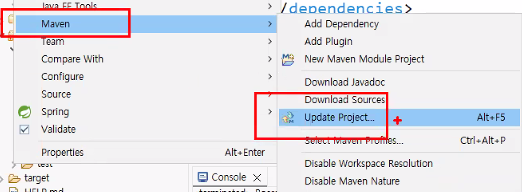

2. 어플리케이션 컨텍스에 AOP 스키마 추가(네임스페이스)
현재 사용하는 컨텍스트가 어플리케이션 컨텍스트이므로 여기에 스키마를 추가해야한다
<?xml version="1.0" encoding="UTF-8"?>
<beans xmlns="http://www.springframework.org/schema/beans"
       xmlns:context="http://www.springframework.org/schema/context"
       xmlns:aop="http://www.springframework.org/schema/aop"
       xmlns:xsi="http://www.w3.org/2001/XMLSchema-instance"
       xsi:schemaLocation="
        http://www.springframework.org/schema/beans
        https://www.springframework.org/schema/beans/spring-beans.xsd
        http://www.springframework.org/schema/context
        https://www.springframework.org/schema/context/spring-context.xsd
        http://www.springframework.org/schema/aop
        https://www.springframework.org/schema/aop/spring-aop.xsd">

   <context:component-scan base-package="com.example.biz" />

</beans>
3.AOP설정
3-1 포인트컷 설정
선택될 비즈니서 메서드를 정의하는 파트로 내가 가진 crud중에 어떤 비즈니스메서드에 결합할건지를 결정할수있다
expression은 표현식이라는 뜻으로 여기서는 포인트컷 표현식이라고 한다 id 앞에 지정한 표현식의 이름을 지정한것이다
괄호 안에 메서드 시그니처를 넣고 인풋과 아웃풋을 정해준다
- * ▶ 아웃풋이 어떤 형태인지 상관없다
- com.example.biz..*Impl.* ▶ 비즈니스 메서드
- (..) ▶ 인풋으로 개수무관
 <bean class="com.example.biz.common.LogAdvice" id="la" /> // 빈클래스로 새로운 객체를 생성
   <bean class="com.example.biz.common.PlusLogAdvice" id="pla" />

   <aop:config> // AOP 설정
      // 선택될 비즈니스 메서드를 정의하는 파트
      //(* com.example.biz..*Impl.*(..)) = 모든 CRUD
         <aop:pointcut expression="execution(* com.example.biz..*Impl.*(..))" id="aPointcut" />
      // (* com.example.biz..*Impl.get*(..)) = 모든 get
         <aop:pointcut expression="execution(* com.example.biz..*Impl.get*(..))" id="bPointcut" />
   </aop:config>
3-2 에스펙트 설정
이제 어드바이스와 포인트컷을 결합해야한다
//<aop:aspect ref ="어드바이스 객체명">
//	<aop:동작시점 method= "그객체가 갖는 메서드명" pointcut-ref="결합할포인트컷명" />
//</aop:aspect>

<aop:aspect ref ="la"> //<bean class id=la>
	<aop:before method= "printLog" pointcut-ref="aPointcut" />
</aop:aspect>
에스펙트는 이렇게 설정 할수 있는데 에스펙트에서 사용할수 있는 설정으로 태그를 열면 동작시점을 만날수있다
aop:after ▶ 핵심관심사 후에
aop:after-returning ▶ 핵심관심사 반환후에=아웃풋이 있냐없냐
aop:after-throwing ▶ 핵심관심사 예외발생하면
aop:around ▶ 핵심관심사 전후로
aop:before ▶ 핵심관심사 전
이렇게 설정을 완료하고 클라이언트에서 실행시키면 콘솔에 로그가 출력되서 나온다
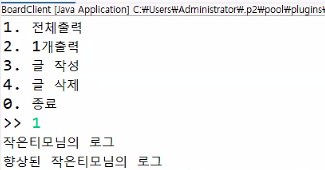
다른 동작시점도 설정해본다면
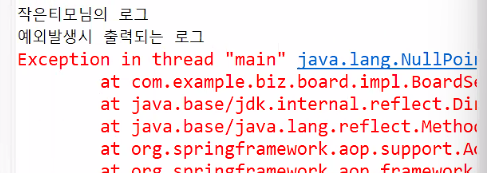
aop:after-throwing은 예외가 발생했을때 출력되는 로그다
<bean class="com.example.biz.common.AfterThrowingAdvice" id="ata"/>

<aop:aspect ref="ata">
<aop:after-throwing method="printLog" pointcut-ref="aPointcut"/>
</aop:aspect>
어드바이스 생성
public class AfterThrowingAdvice {
	public void printLog() {
		System.out.println("예외발생시 출력되는 로그");
	}
}
로그 출력을 확인하기 위해 일부러 에러를 내보았다
@Override
	public boolean insertBoard(BoardDTO dto) {
		if(dto.getBid() == 0) { // == 항상
			throw new NullPointerException("런타임 에러");
		}
		return boardDAO.insertBoard(dto);
	}
클라이언트를 실행하면 이렇게 예외가 발생되면서 로그가 출력되는 것을 알수있다
에러를 처리할때는 어드바이스를 사용하기 보다는 로직으로 에러를 처리하는게 더 좋다
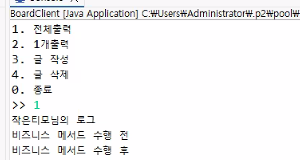
aop:around는 인터셉터처럼 구현되는데 인터셉터는 스틸, 방해라는 뜻으로 현재 잘 수행되고 있는 조인포인트를 중간에 탈취하는 느낌으로 실행된다 즉 실행 전후를 다 다룰수 있고 인자로 ProceedingJoinPoint를 사용한다
public class AroundAdvice {
	public Object around(ProceedingJoinPoint pjp) throws Throwable {
		System.out.println("비즈니스 메서드 수행 전");

		Object returnObj = pjp.proceed(); //비즈니스 메서드
        //수행완료 boolean,List,DTO,Object 등 반환하기도함

		System.out.println("비즈니스 메서드 수행 후");

		return returnObj;
	}
}
클라이언트를 실행시키면 이렇게 콘솔에 로그가 출력된다
'🐢 꼬부기 LV.1 | 개념•기초 > 💧물대포(핵심개념)' 카테고리의 다른 글
| AOP - 스프링 부트식 @사용해보기 (0) | 2026.01.27 |
|---|---|
| 어드바이스 사용해보기 (0) | 2026.01.26 |
| AOP 용어 정리 (0) | 2026.01.23 |
| 스프링부트에서 데이터 주고 받기 (0) | 2026.01.19 |
| 스프링부트 맛보기 (0) | 2026.01.18 |